Rimays Safety AI tools for safer project evidence and action.

Explore the Rimays Safety AI brochure as a slideshow, then connect directly to the AI platform for project safety intelligence.

Rimays Safety AI

AI safety intelligence connected to OSHCDM work.

Rimays Safety AI supports project control, worker identity, live monitoring, Ask AI, vision analysis, HIRARC V2, CDM documentation, supervisor alerts, reporting, and continuous model learning.

  • Capture site evidence from phones, tablets, computers, virtual cameras, CCTV links, and IP camera feeds.
  • Analyse safety images and video, then turn reviewed findings into records.
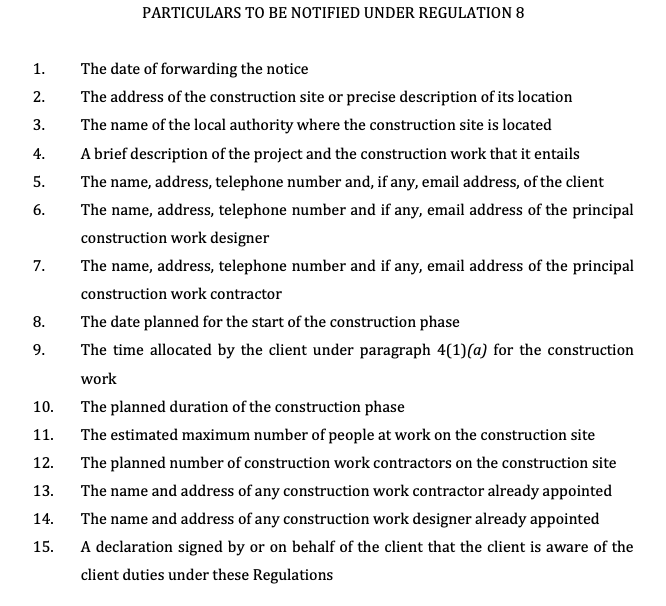
  • Connect AI outputs with HIRARC V2, CDM1-CDM7, JKKP12, alerts, and project reports.
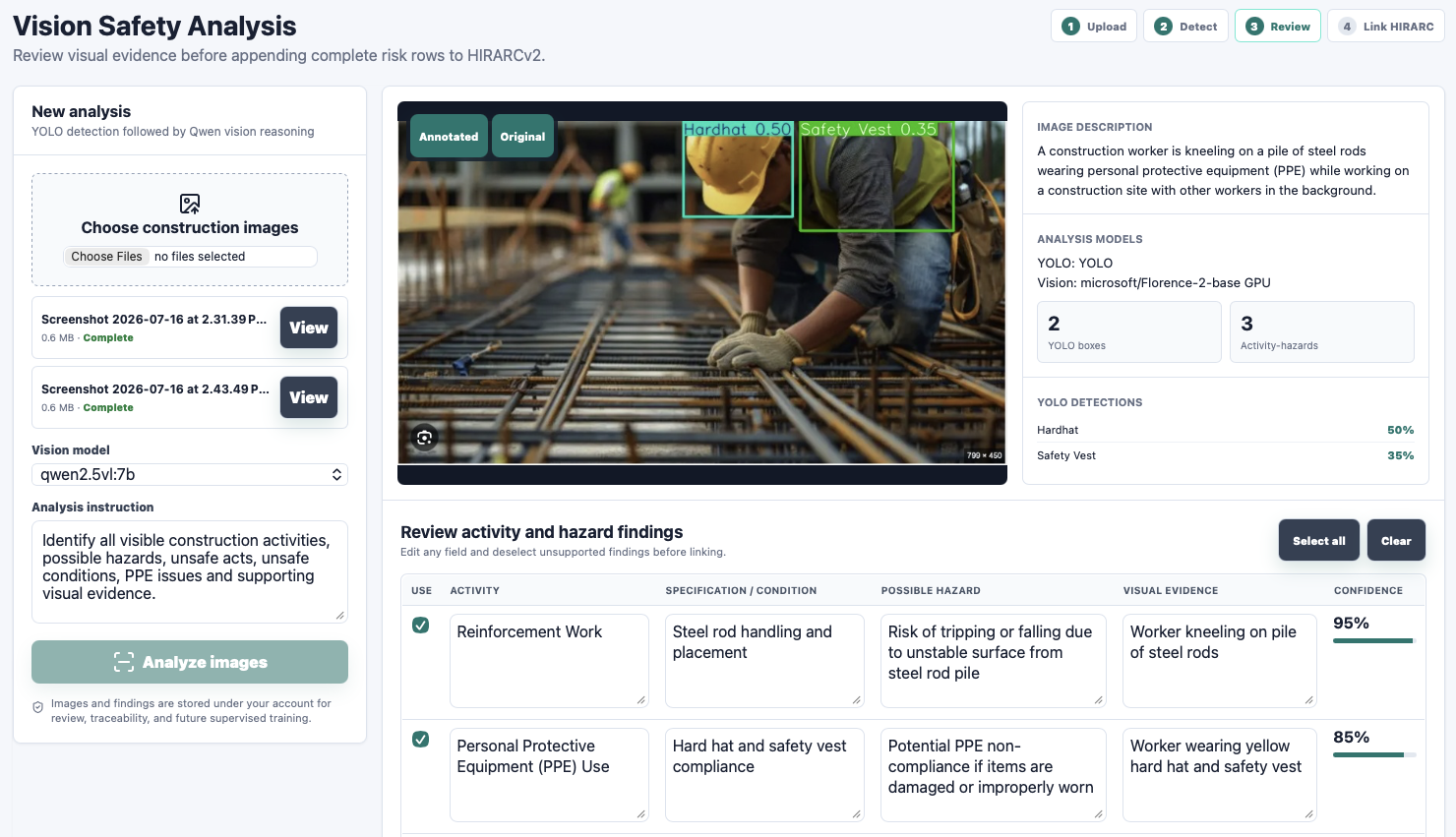
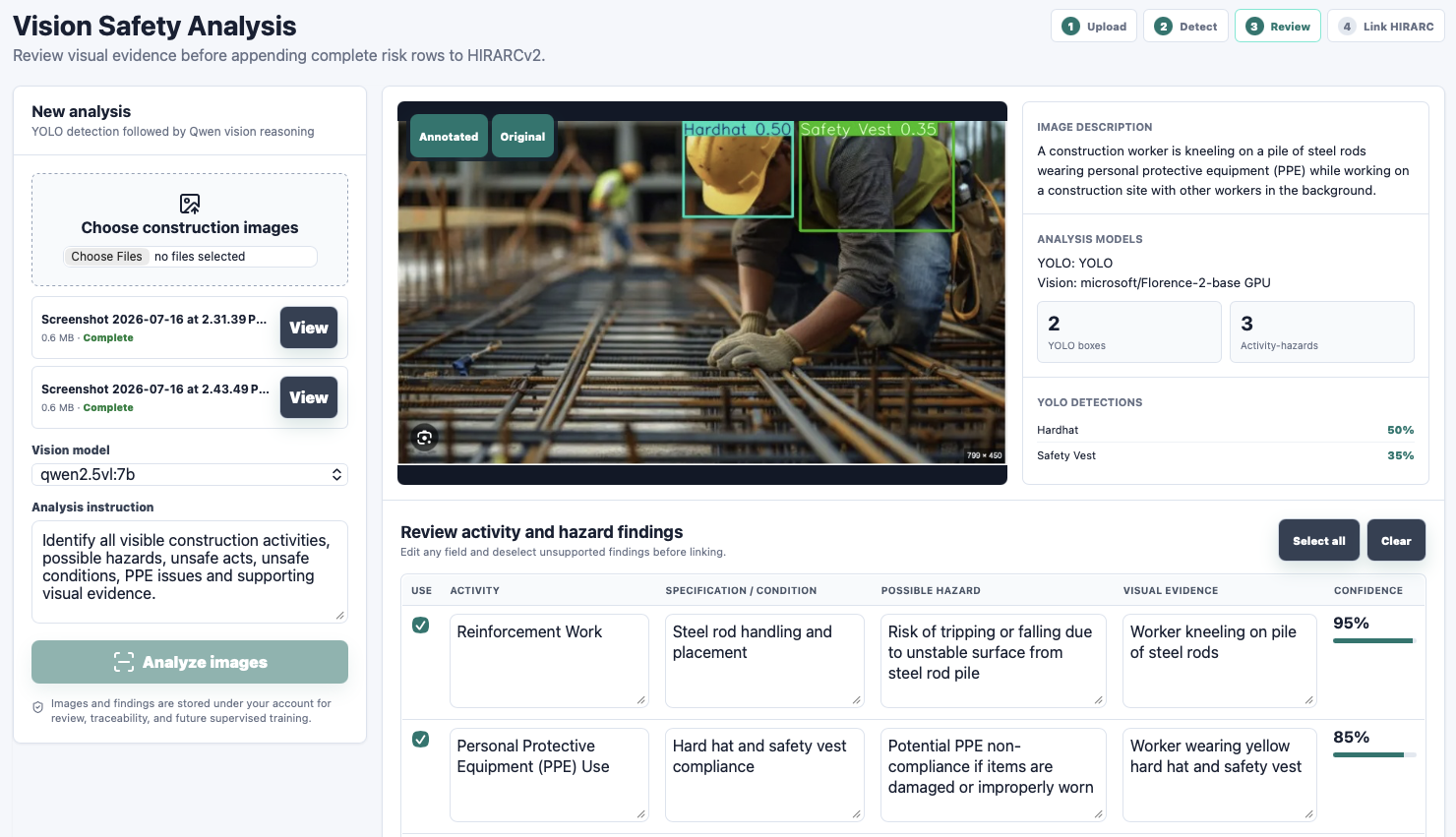
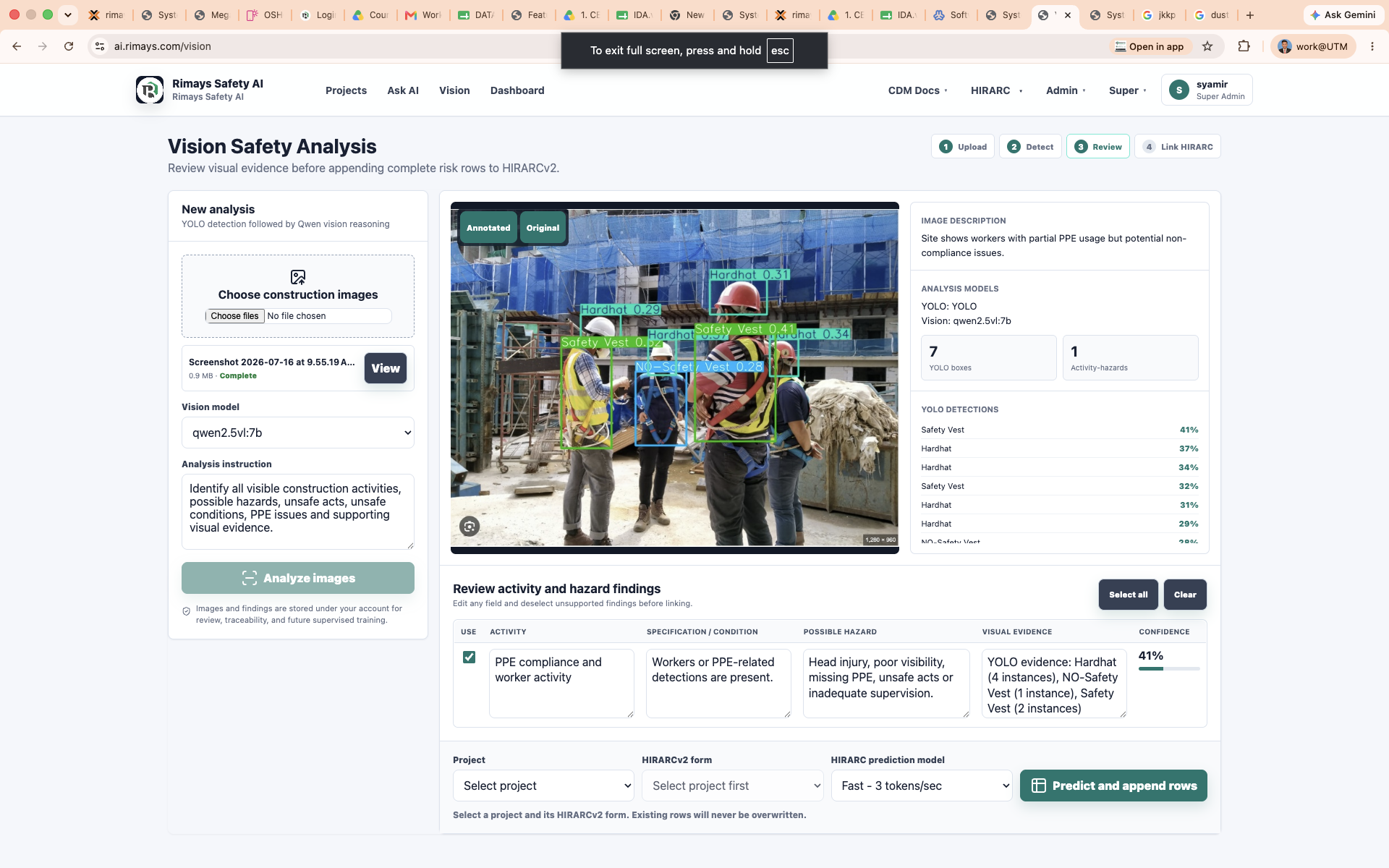
Rimays Safety AI vision analysis screenshot
Vision safety analysis preview from the Rimays Safety AI brochure.

Tool Slideshow

Rimays Safety AI brochure preview.

Use the slideshow to scan the tool capability before opening the full AI platform.

Rimays Safety AI overview screenshot
Slide 01

Rimays Safety AI

A commercial AI safety platform for project control, worker identity, live monitoring, Ask AI, vision analysis, HIRARC V2, CDM documentation, supervisor alerts, and verified model training.

  • Human-reviewed AI findings.
  • Evidence linked to project records.
  • Built for Malaysian CDM and safety workflows.
Rimays Safety AI platform workflow screenshot
Slide 02

One system from capture to improvement.

The platform connects evidence capture, AI analysis, safety control, documentation, and model learning inside one project workspace.

  • Capture from device cameras or CCTV sources.
  • Analyse with Vision AI and Ask AI.
  • Improve detections using verified labels.
Project notification workflow screenshot
Slide 03

Project workspace and supervisor action.

Each project becomes a control hub for worker registration, company management, project members, JKKP12 notification, live detection, reports, and alerts.

  • Worker registration and face detection.
  • Project member and company access control.
  • Supervisor alerts with project context.
Vision AI hazard analysis screenshot
Slide 04

Ask AI and Vision analysis.

Ask AI supports DOSH, construction safety, CDM, and HIRARC questions, while Vision AI analyses site images and videos to produce editable findings.

  • Ask project safety questions.
  • Analyse photos and video evidence.
  • Append reviewed findings to HIRARC V2.
Rimays Safety AI dashboard screenshot
Slide 05

Dashboard and continuous learning.

The dashboard helps teams review labels, assign reviewers, approve classes, evaluate model performance, and create new safety detection capability from real site data.

  • Review and approve labels.
  • Assign reviewers by detection class.
  • Track training and model readiness.
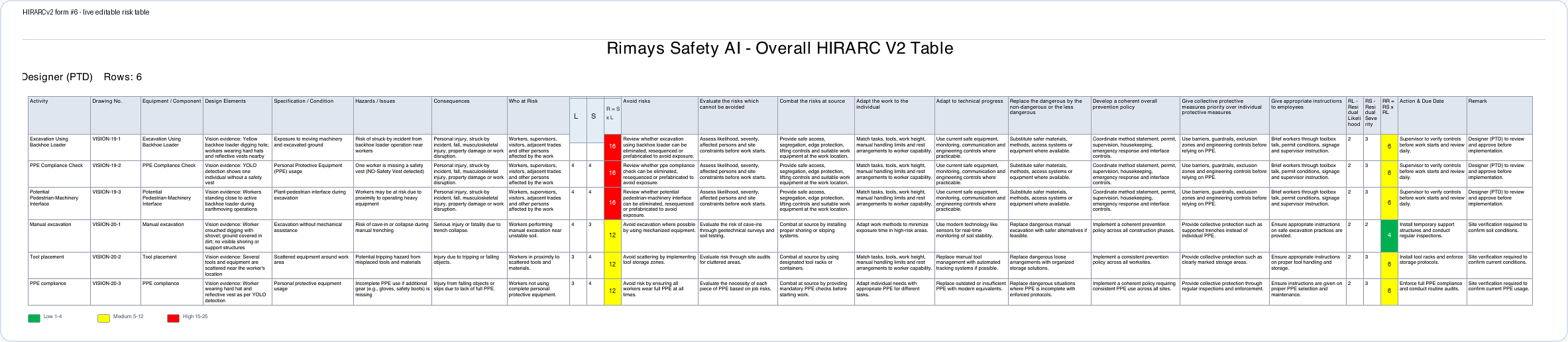
HIRARC V2 table screenshot
Slide 06

HIRARC V2 and CDM documentation.

CDM Docs V2 and HIRARC V2 convert project information, visual evidence, and AI suggestions into editable, reviewable, and printable safety records.

  • Role-based HIRARC and risk review.
  • GPP controls and residual risk tracking.
  • Append AI rows without overwriting saved work.
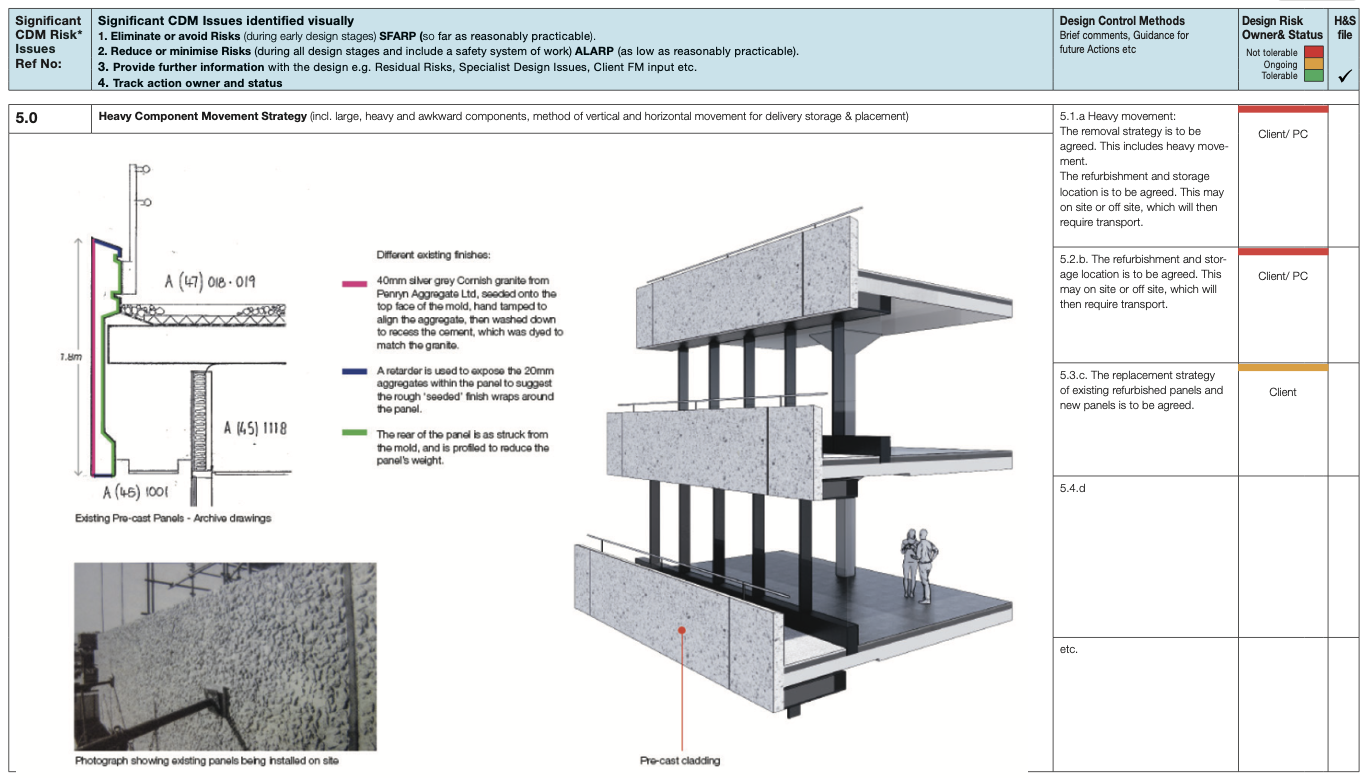
CDM4 visual annotation register screenshot
Slide 07

Visual CDM risk records.

CDM records can connect visual evidence, design controls, residual risk notes, owners, and status into one project trace.

  • CDM1-CDM7 document support.
  • CDM3 issue registers and CDM4 visual annotation.
  • Project-linked evidence and record exports.
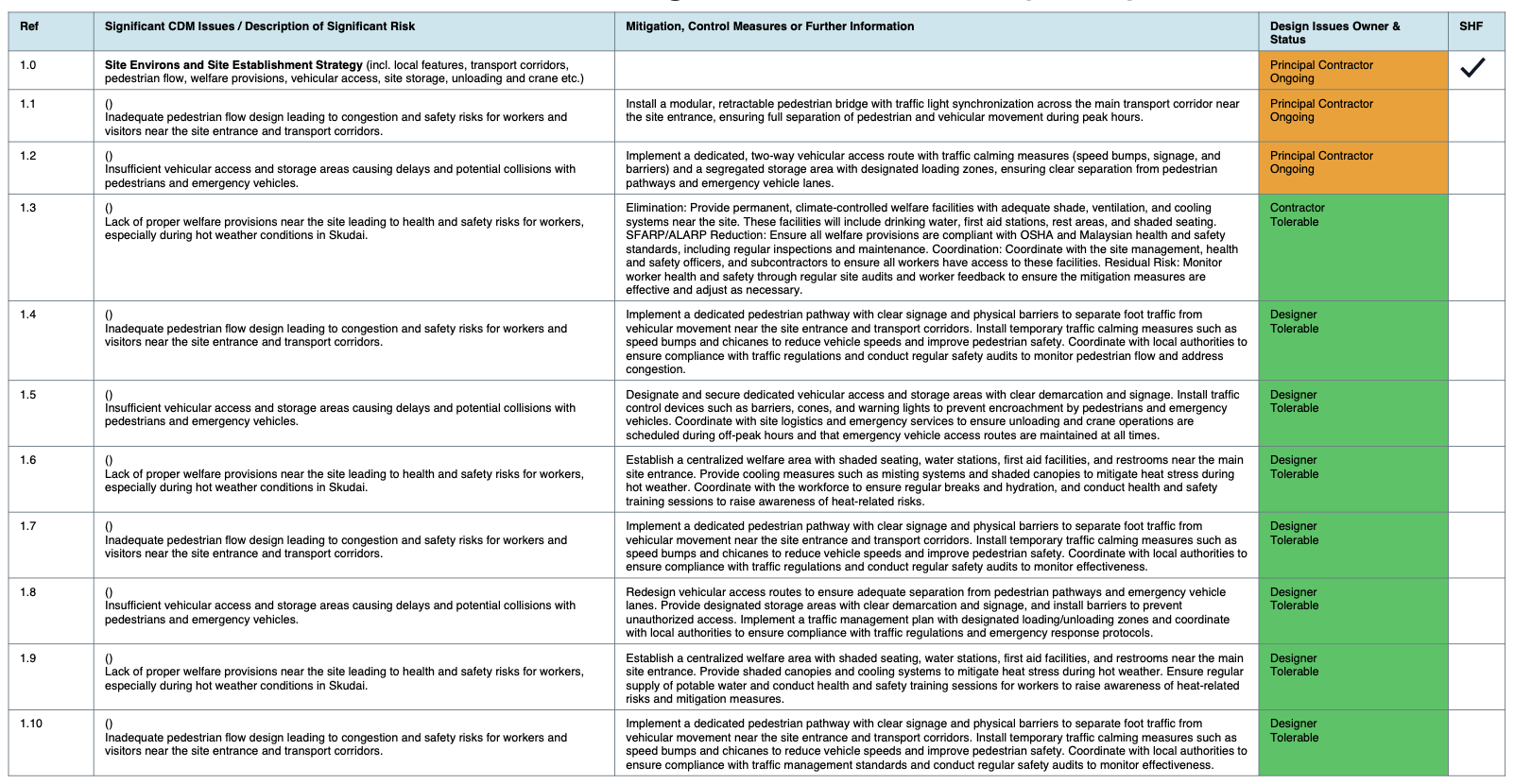
CDM3 significant issues table screenshot
Slide 08

Plans, API products, and growth controls.

Rimays Safety AI supports Basic, Plus, Pro, and Enterprise usage models, with upgrade codes, affiliate workflows, API products, storage, and enterprise control.

  • Scale by project size and usage.
  • Use API products for connected apps.
  • Support white-label and enterprise deployment.
Rimays Safety AI executive call to action screenshot
Slide 09

Deploy safety intelligence where work happens.

Use Rimays Safety AI to capture real site evidence, review AI findings, assign action owners, and produce professional safety records.

Slide 1 of 9

Tool Actions

Connect to Rimays Safety AI.

App

Open AI Platform

Go straight to Rimays Safety AI login for project safety intelligence tools.

Connect to AI
Brochure

Public Slideshow

Open the full external brochure with print preview and public brochure link.

Open Brochure
PDF

Download Brochure

Download the A4 print-ready Rimays Safety AI product brochure.

Download PDF
OSHCDM

Use With CDM

Use OSHCDM Guide, CDM Module, and Templates together with AI evidence tools.

Open Guide

Next Step

Open the AI platform or continue with OSHCDM guidance.

AI outputs should be reviewed by competent persons before use as official safety records.